4.1 Orchestration Overview
4.1.1 Introduction to Orchestration
Orchestration is what turns a collection of scripts into a reliable, observable data pipeline. This section traces its evolution from cron jobs to modern workflow engines.
Before Orchestration
Before dedicated orchestration tools, engineers relied on cron — a CLI utility from the 1970s that executes commands at specified dates and times. A cron expression uses five fields to define a schedule:
# ┌───────────── minute (0-59)
# │ ┌───────────── hour (0-23)
# │ │ ┌───────────── day of month (1-31)
# │ │ │ ┌───────────── month (1-12)
# │ │ │ │ ┌───────────── day of week (0-6, Sunday=0)
# │ │ │ │ │
# * * * * *  command

  0 0 1 1 *  echo "Happy New Year"   # runs every Jan 1st at midnight
In a real data pipeline, cron jobs schedule each step independently with hardcoded time offsets:
# ingest from REST API -- every night at midnight
0 0 * * *  python ingest_from_rest_api.py

# ingest from database -- every night at midnight
0 0 * * *  python ingest_from_database.py

# transform API data -- 1 AM (assumes ingestion is done by then)
0 1 * * *  python transform_api_data.py

# combine API and database data -- 2 AM (assumes transform is done)
0 2 * * *  python combine_api_and_database.py

# load into data warehouse -- 3 AM (assumes combine is done)
0 3 * * *  python load_to_warehouse.py
This “pure scheduling approach” has significant drawbacks: if one task fails, downstream tasks still run on stale or missing data with no built-in monitoring, alerts, or visibility into what went wrong. Cron is still useful for simple repetitive tasks with no downstream dependencies or during prototyping.
Evolution of Orchestration Tools
As data pipelines grew in complexity, the industry developed increasingly sophisticated tools to manage workflow dependencies and execution:
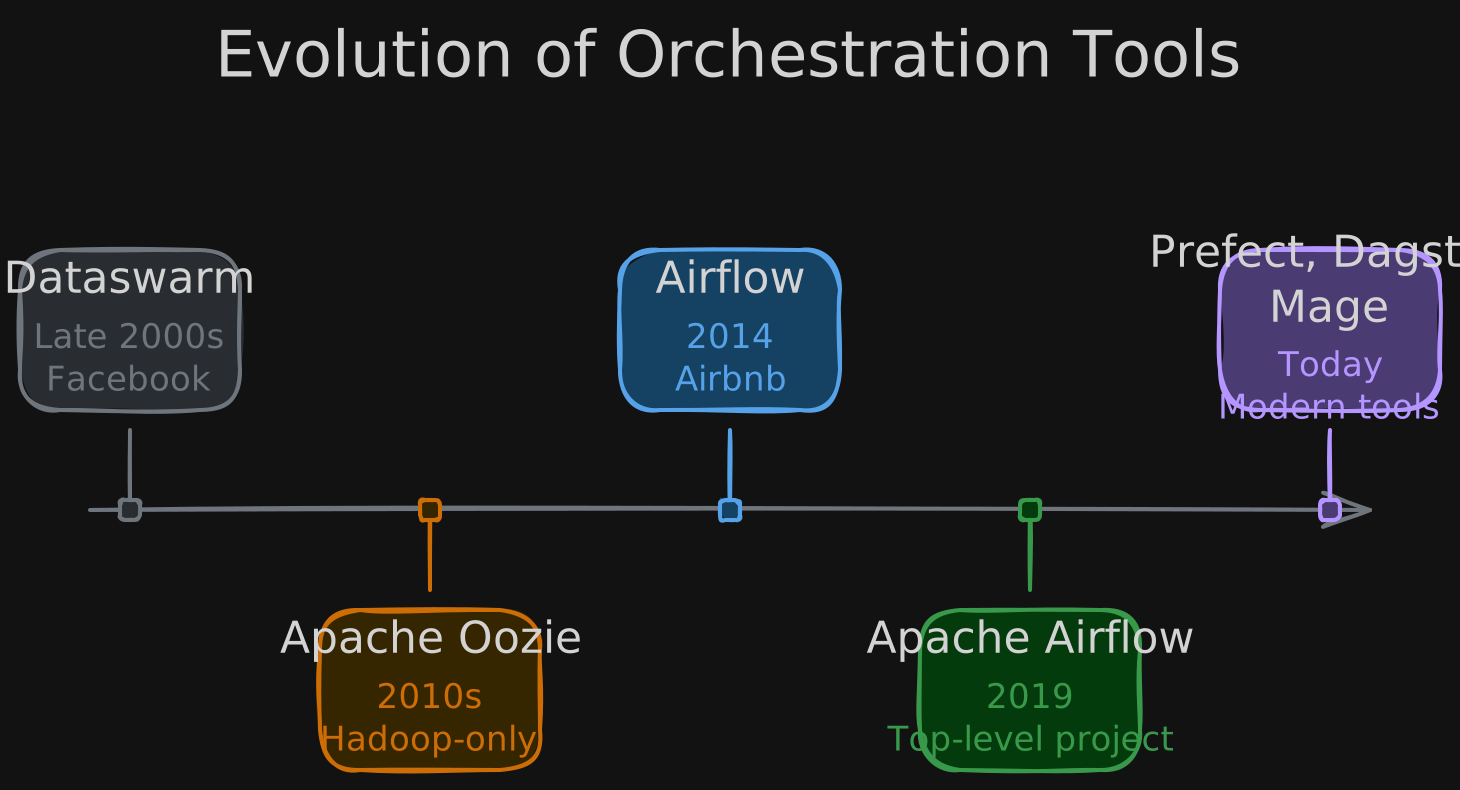
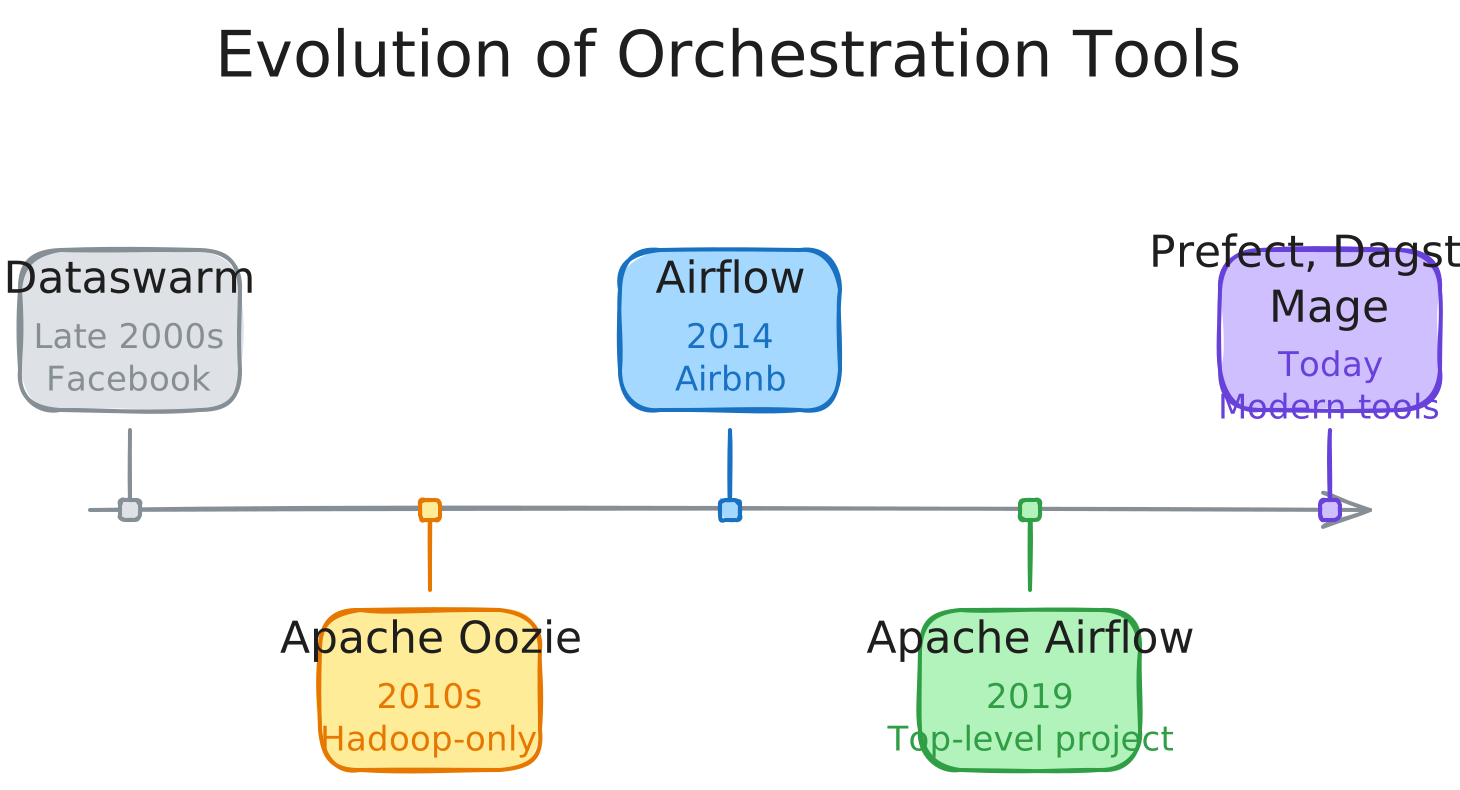
 Apache Oozie

 Apache Airflow

 Prefect

 Dagster

 Mage
Mage
4.1.2 Orchestration Basics
Orchestration adds structure and reliability on top of simple scheduling. Instead of relying on hardcoded time offsets between steps, an orchestrator understands task dependencies and ensures each step runs only after its prerequisites complete successfully.
| Pros | Cons | |
|---|---|---|
| 1 | Set up dependencies between tasks | More operational overhead than simple cron scheduling |
| 2 | Monitor task execution in real time | Requires learning a new framework and its conventions |
| 3 | Get alerts on failures automatically | Additional infrastructure to deploy and maintain |
| 4 | Create fallback and retry plans | Can introduce complexity for very simple pipelines |
4.1.3 Introduction to Apache Airflow
Apache Airflow
Apache Airflow is the most widely adopted open-source orchestration framework for data pipelines, originally developed at Airbnb in 2014.
Airflow lets you define workflows as Python code, giving you the full power of a programming language to express complex dependency logic, branching, and dynamic task generation.
| Advantages | Challenges |
|---|---|
| Written in Python — familiar to most data engineers | Scalability limitations with very large DAG counts |
| Open source with a very active community | Ensuring data integrity across task retries |
Available as a managed service on AWS (MWAA) and GCP (Cloud Composer) | No native support for streaming pipelines |
| Extensive library of pre-built operators and hooks | Scheduler can become a bottleneck under heavy load |
| Rich UI for monitoring and debugging workflows | DAG parsing overhead grows with codebase size |
Airflow Architecture
Airflow organizes workflows as Directed Acyclic Graphs (DAGs) — graph representations where nodes are tasks and edges define the flow of execution. “Directed” means data flows one way; “acyclic” means no circular dependencies. DAGs are defined entirely in Python.
A basic DAG definition creates tasks using operators and wires them together with dependency syntax:
from airflow import DAG
from airflow.operators.python import PythonOperator
from datetime import datetime

# define the DAG and its schedule
with DAG(
    dag_id="dag_etl_example",
    start_date=datetime(year=2024, month=3, day=13),
    schedule="@weekly",          # also supports cron expressions like "0 0 * * *"
    catchup=False,               # don't backfill missed runs
    description="Weekly ETL pipeline",
    tags=["data_engineering_team"],
):

    # each task wraps a Python function using PythonOperator
    task_ingest_api = PythonOperator(
        task_id="ingest_from_API",
        python_callable=ingest_from_rest_api,
    )
    task_ingest_database = PythonOperator(
        task_id="ingest_from_database",
        python_callable=ingest_from_database,
    )
    task_transform_api = PythonOperator(
        task_id="transform_data",
        python_callable=transform_api_data,
    )
    task_combine_data = PythonOperator(
        task_id="combine_data",
        python_callable=combine_api_and_database,
    )
    task_load_warehouse = PythonOperator(
        task_id="load_warehouse",
        python_callable=load_to_warehouse,
    )

    # define dependencies -- Airflow handles execution order automatically
    # API ingestion feeds into transform, while database ingestion runs in parallel
    # -- both converge at combine, then load
    [task_ingest_api >> task_transform_api, task_ingest_database] >> task_combine_data >> task_load_warehouse
Trigger conditions can be time-based (cron expressions, presets like @daily) or event-based. For example, an S3 sensor waits for a file to appear in a bucket before proceeding:
from airflow.providers.amazon.aws.sensors.s3 import S3KeySensor

# wait for a file to land in S3 before running downstream tasks
s3_sensor = S3KeySensor(
    task_id="s3_file_check",
    bucket_key="my_file.csv",         # the file key to watch for
    bucket_name="my_bucket_name",     # the S3 bucket to monitor
    aws_conn_id="my_aws_connection",  # connection configured in Airflow UI
    poke_interval=300,                # check every 5 minutes
    timeout=3600,                     # give up after 1 hour
)
Monitoring, logging, and alerts are built into Airflow. The UI lets you visualize DAGs, trigger runs, monitor task progress, and troubleshoot issues. Built-in data quality checks support schema verification, null value checks, and range validation.
Core Components
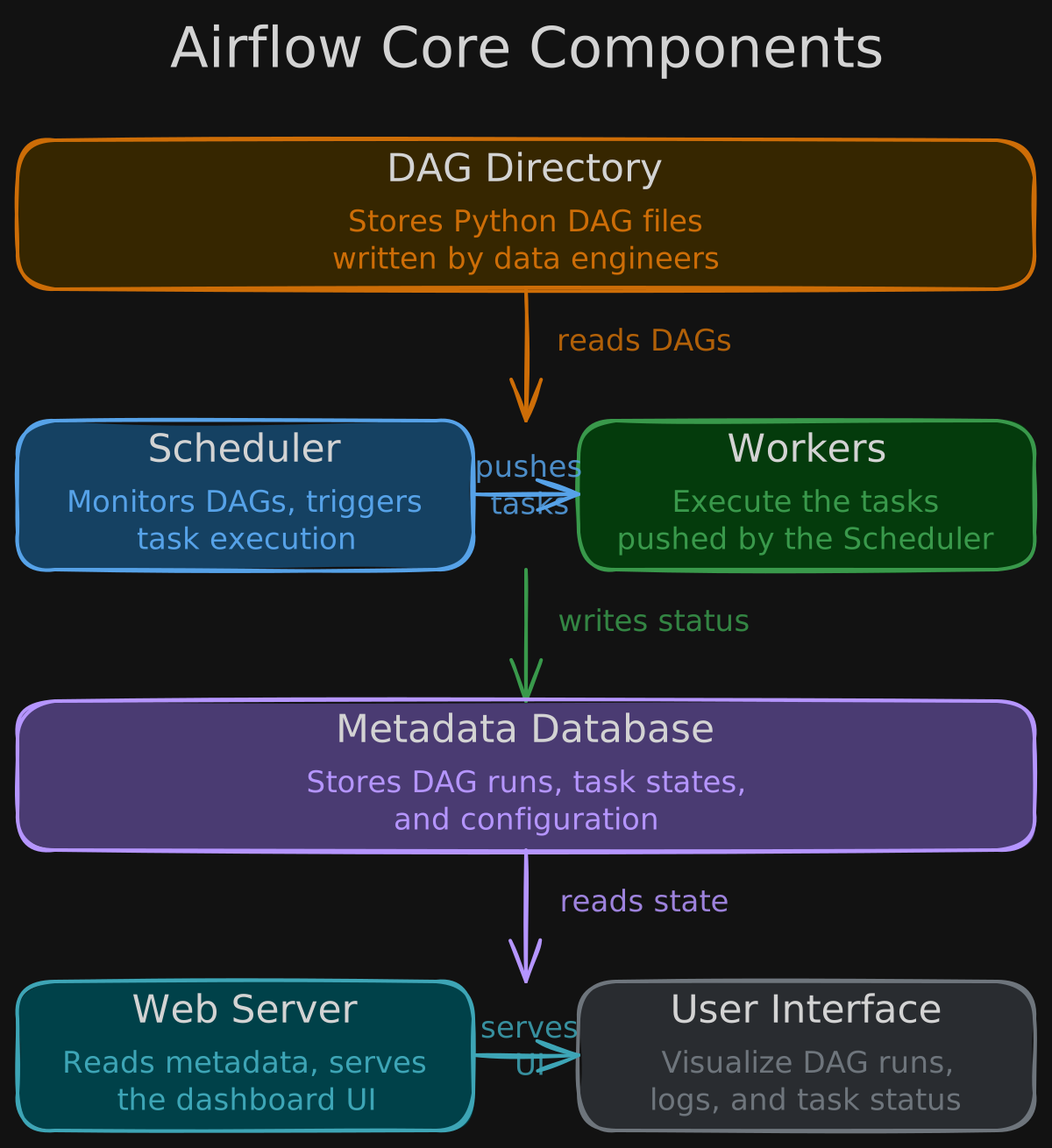
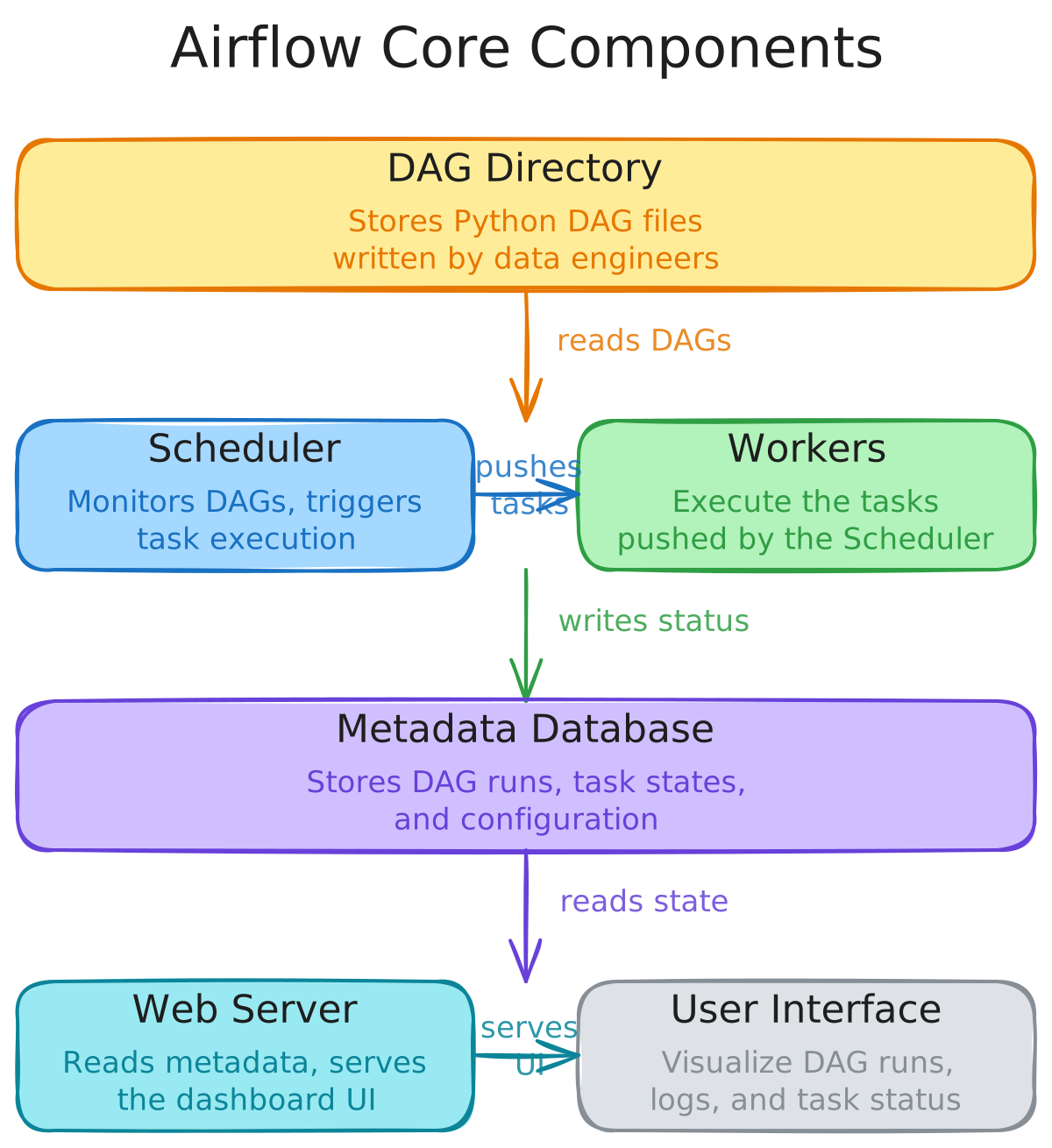
Airflow’s architecture consists of several interacting components. Python scripts defining DAGs are stored in the DAG Directory. The Scheduler continuously monitors this directory, determines which tasks are ready to run, and pushes them to the Workers for execution. Workers update task statuses (scheduled, queued, running, success, or failed) in the Metadata Database. The Web Server reads from this database and renders the information in the User Interface, where engineers can visualize DAGs, inspect logs, and trigger manual runs.
4.1.4 Backfilling and Reprocessing
Backfilling is the process of rerunning a pipeline over historical time intervals - for example, reprocessing the last 90 days after fixing a transformation bug or adding a new column. It is one of the most common operational tasks in data engineering.
Why Backfills Happen
- A bug in transformation logic produced incorrect values for a period of time
- A new column or metric is added and needs to be populated for historical data
- A source system retroactively corrects or restates past records
- A pipeline was down during a period and needs to catch up
Backfilling in Airflow
Airflow has native support for backfilling through its scheduling model. Every DAG run is associated with a logical date (formerly execution_date) representing the data interval being processed, not the wall-clock time of execution.
| Parameter | Role |
|---|---|
start_date | The earliest logical date for the DAG |
catchup | When True, Airflow schedules runs for all missed intervals between start_date and now |
backfill CLI | Manually trigger runs for a specific date range: airflow dags backfill -s 2025-01-01 -e 2025-03-01 my_dag |
Designing for Backfill-Friendliness
Pipelines that are easy to backfill share several properties:
- Idempotent - rerunning the same interval produces the same result without side effects
- Parameterized by date - the pipeline reads its processing window from the logical date, not from
datetime.now() - Partitioned output - each run writes to a distinct partition (e.g.,
s3://bucket/output/date=2025-03-15/) so backfills overwrite only the affected intervals - No cross-interval dependencies - each run processes its interval independently without relying on the output of adjacent runs