4.2 Airflow UI and DAG Creation
4.2.1 Airflow UI
The Airflow web UI is the primary interface for managing and monitoring workflows. It provides visibility into DAG status, task execution, logs, and configuration — all from a browser.
DAGs Page
The main landing page lists every DAG discovered in the DAG directory. For each DAG it shows the owner, schedule interval, last run timestamp, current status, and a mini status bar for individual tasks within the most recent run. From this page you can toggle DAGs on/off, trigger a manual run, or delete a DAG entirely.
DAG Detail Views
Clicking into a DAG opens a set of views that help you understand and debug pipeline runs:
| View | Purpose |
|---|---|
| Grid | Matrix of all runs with per-task status cells — quickly spot patterns of failure |
| Graph | Visual representation of task dependencies — shows the DAG structure |
| Gantt | Timeline bars for each task — identifies bottlenecks and long-running tasks |
| Code | The Python source code that defines the DAG |
| Logs | Stdout/stderr output for each task instance — primary debugging tool |
4.2.2 Creating DAGs and Using Operators
DAGs are created using the airflow.DAG() context manager. A typical ETL pipeline defines separate tasks for each stage and wires them together with dependency operators.
from airflow import DAG
from airflow.operators.python import PythonOperator
from datetime import datetime

# define the DAG using a context manager
with DAG(
    dag_id="my_first_dag",
    description="ETL pipeline",
    tags=["data_engineering_team"],
    schedule="@daily",                          # run once per day at midnight
    start_date=datetime(2024, 12, 1),
    catchup=False,                              # don't backfill missed runs
):
    # each task wraps a Python function
    task_1 = PythonOperator(
        task_id="extract",
        python_callable=extract_data,           # function defined elsewhere
    )
    task_2 = PythonOperator(
        task_id="transform",
        python_callable=transform_data,
    )
    task_3 = PythonOperator(
        task_id="load",
        python_callable=load_data,
    )

    # set dependencies -- extract runs first, then transform, then load
    task_1 >> task_2 >> task_3
Operators
Operators define what each task actually does. Airflow provides a rich library of built-in operators:
| Operator | Module | Purpose |
|---|---|---|
PythonOperator | airflow.operators.python | Executes a Python callable |
BashOperator | airflow.operators.bash | Runs a bash command or script |
EmptyOperator | airflow.operators.empty | No-op task — useful as a join point for complex dependencies |
EmailOperator | airflow.operators.email | Sends email notifications |
S3KeySensor | airflow.providers.amazon.aws.sensors.s3 | Waits for a file to appear in S3 before proceeding |
Task Dependencies
The >> and << bit-shift operators define execution order between tasks. Use Python lists to express parallel execution and convergence:
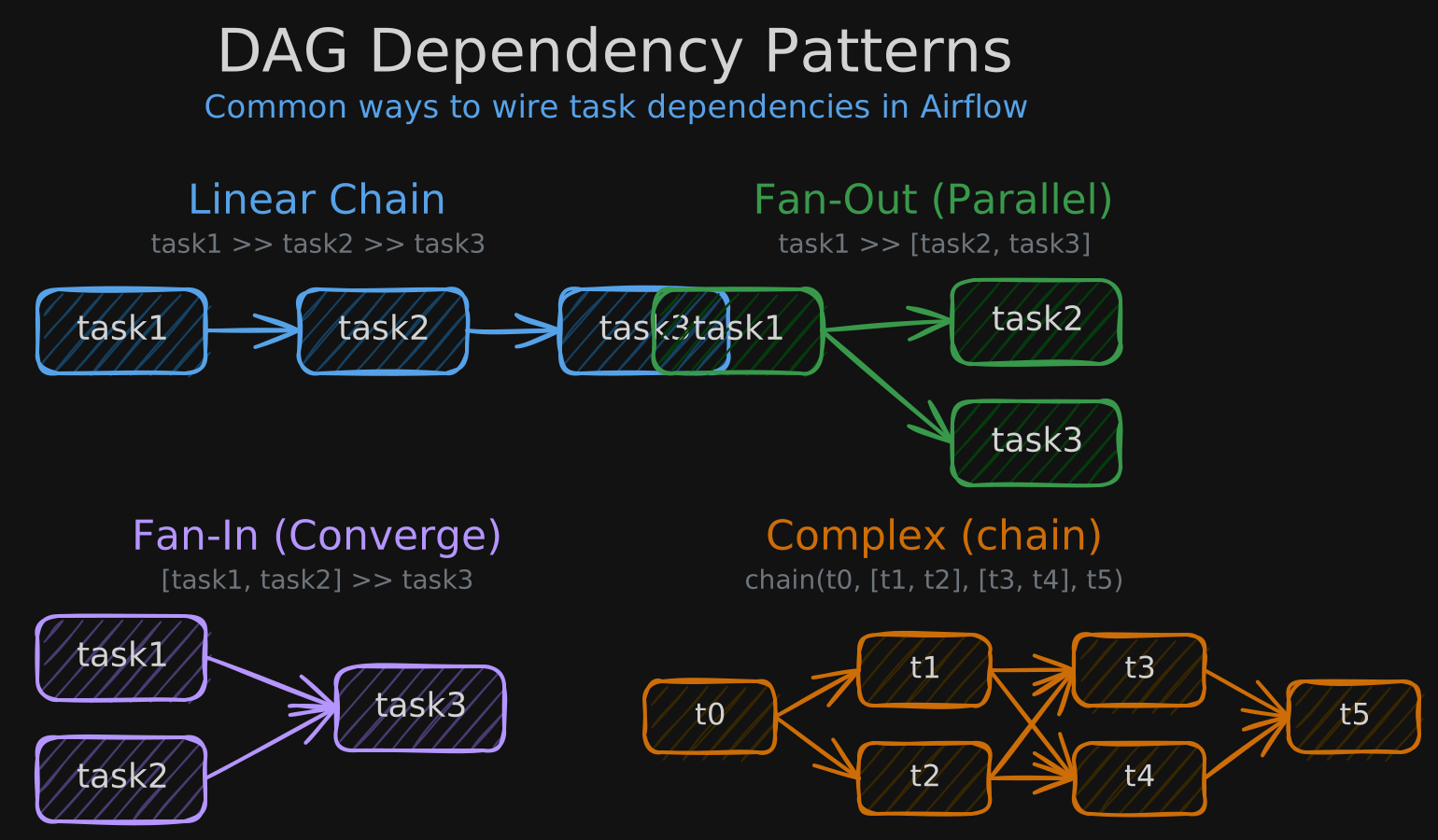
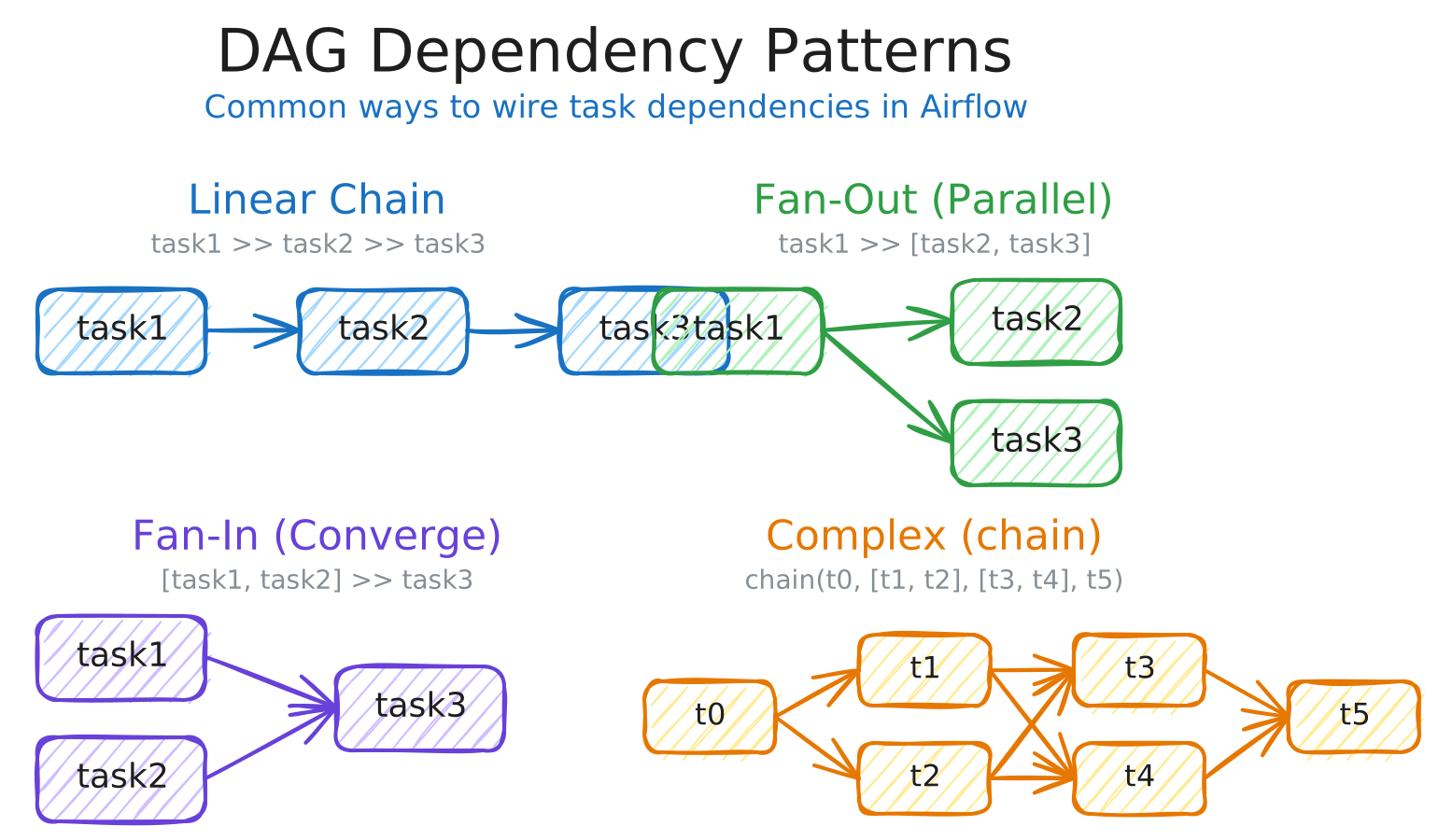
For complex many-to-many dependencies where list syntax won’t work, use the chain() utility:
from airflow.models.baseoperator import chain

# chain() connects each layer to the next -- equivalent to writing
# all individual t0>>t1, t0>>t2, t1>>t3, t1>>t4, ... arrows manually
chain(task0, [task1, task2], [task3, task4], task5)
4.2.3 XComs and Variables
XComs (Cross-Communication)
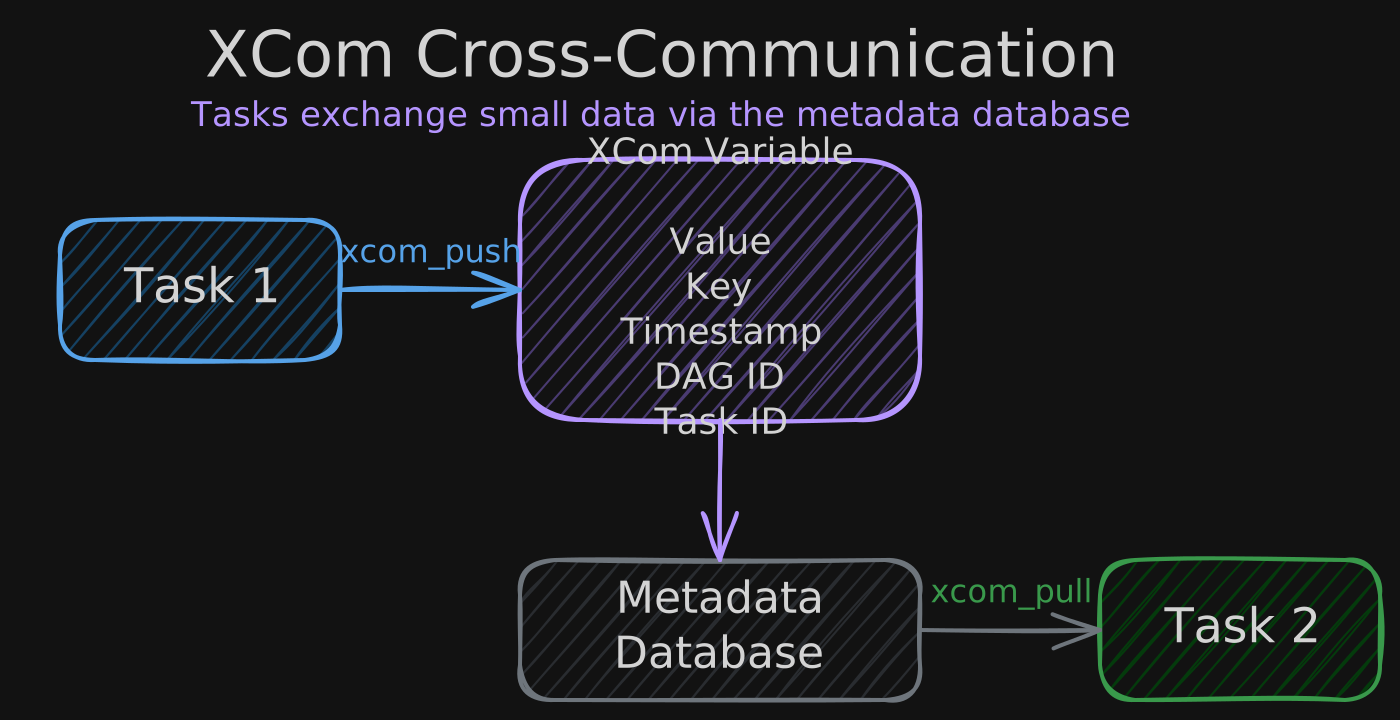
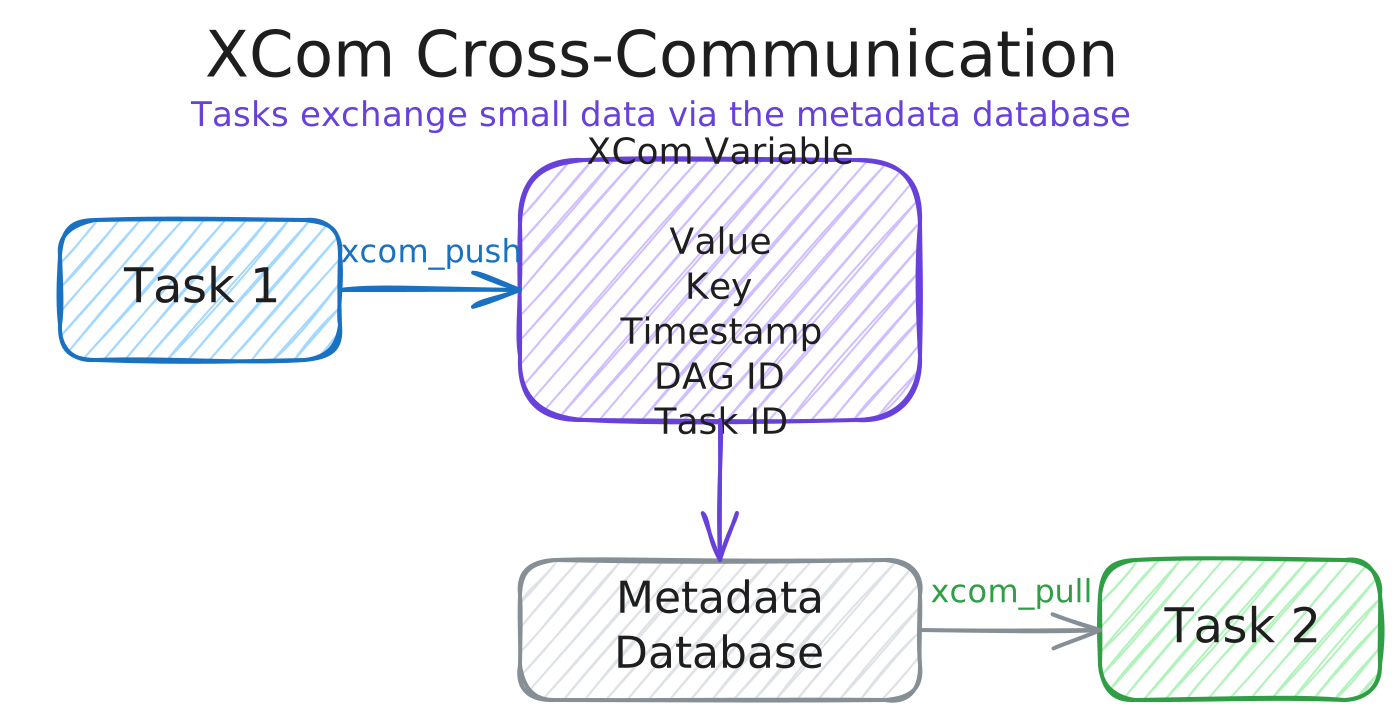
XComs allow tasks to exchange small pieces of data — metadata, dates, single-value metrics, and simple computations. They are not designed for large objects like DataFrames.
The flow works through the metadata database: one task pushes a value with xcom_push, and another task retrieves it with xcom_pull. Both methods are accessed through the task instance object in the execution context.
def extract_from_api(**context):
    """Extract data and push a computed metric via XCom."""
    import requests

    response = requests.get(
        "https://jobicy.com/api/v2/remote-jobs",
        params={"count": 40, "geo": "usa", "tag": "data engineer"},
    ).json()

    # compute a metric from the response
    senior_count = sum(1 for job in response["jobs"] if job["jobLevel"] == "Senior")
    ratio = senior_count / len(response["jobs"])

    # push the value to XCom -- stored with key, timestamp, DAG ID, and task ID
    context["ti"].xcom_push(key="ratio_senior_jobs", value=ratio)


def load_results(**context):
    """Pull the metric from a previous task via XCom."""
    # retrieve by key and source task ID
    ratio = context["ti"].xcom_pull(
        key="ratio_senior_jobs",
        task_ids="extract",
    )
    print(f"Senior job ratio: {ratio}")
XComs are visible in the Airflow UI under Admin > XComs. For large objects like DataFrames, save them to intermediate storage (e.g., S3) and read the path in the downstream task instead.
Airflow Variables
Variables let you avoid hard-coding configuration values inside tasks. Create them in the Airflow UI (Admin > Variables) or as environment variables prefixed with AIRFLOW_VAR_.
from airflow.models import Variable

# retrieve a simple string variable
num_posts = Variable.get(key="number_post")

# retrieve a JSON variable and access a nested key
# passing deserialize_json=True parses the stored JSON string into a dict
locations = Variable.get(key="locations", deserialize_json=True)
geos = locations["geo"]    # e.g. ["usa", "canada", "france", "australia"]
Variables are global — they apply across the entire Airflow installation. Use them for installation-wide configuration (API endpoints, bucket names, connection strings). To pass data between tasks within a single DAG run, use XComs instead.
Built-in Variables and Jinja Templating
Airflow provides a set of built-in variables with information about the current DAG run, such as the logical date (ds), execution date, and task instance. You can access them in two ways:
# option 1: via the context dictionary inside a task function
def my_task(**context):
    logical_date = context["ds"]                # "2024-12-01"
    print(f"Processing data for {logical_date}")


# option 2: via Jinja templating in operator arguments
task_load_s3 = PythonOperator(
    task_id="load_to_s3",
    python_callable=load_to_s3,
    # {{ ds }} is replaced at runtime with the logical date of the DAG run
    op_kwargs={"file_name": "data/created_{{ ds }}/file.csv"},
)
4.2.4 DAG Best Practices
Well-written DAGs are efficient, readable, idempotent, and reproducible.
| Practice | Details |
|---|---|
| Keep tasks atomic | Each task should represent a single operation. An ETL pipeline needs at least three tasks (extract, transform, load) — not one monolithic task that does everything. Atomic tasks improve visibility, enable targeted retries, and support idempotency. |
| Avoid top-level code | Any code outside of DAG/operator definitions is parsed by the scheduler every ~30 seconds. API calls, database queries, or heavy computations at the module level cause performance issues. Keep all logic inside operator callables. |
| Use variables | Don’t hard-code values like bucket names, API URLs, or thresholds. Store them as Airflow Variables or environment variables so they can be updated without code changes. |
| Use task groups | Organize related tasks visually in the UI using TaskGroup. This improves readability for complex DAGs without changing execution behavior. |
| Airflow is an orchestrator, not an executor | Heavy processing belongs in execution frameworks like Spark, dbt, or AWS Glue. Airflow should trigger and monitor these jobs, not run the computation itself. |
| Don’t pass large data via XComs | XComs store data in the metadata database. For large objects, write to intermediate storage (S3, a staging table) and pass the reference path instead. |
| Keep task code in separate files | Import your Python functions from a module rather than defining them inline in the DAG file. This improves readability and testability. |
Task Groups Example
from airflow.utils.task_group import TaskGroup

with DAG(...):
    start = EmptyOperator(task_id="start")

    # group related tasks -- they appear as a collapsible block in the UI
    with TaskGroup("transform_group") as transform_group:
        clean = PythonOperator(task_id="clean", python_callable=clean_data)
        enrich = PythonOperator(task_id="enrich", python_callable=enrich_data)
        clean >> enrich

    end = EmptyOperator(task_id="end")

    start >> transform_group >> end
Top-Level Code Anti-Pattern
# BAD: these run every time the scheduler parses this file (~every 30s)
call_some_function()           # avoid -- runs at parse time
perform_computation()          # avoid -- runs at parse time

with DAG(dag_id="example", start_date=datetime(2024, 3, 13),
         schedule="@daily", catchup=False):
    # GOOD: this code only runs when the task is actually executed
    task_1 = PythonOperator(task_id="extract", python_callable=extract_api)
    task_2 = PythonOperator(task_id="load", python_callable=load)
    task_1 >> task_2