3.3 Spark and DataFrames
3.3.1 Spark Overview and Architecture


Apache Spark
Apache Spark started at UC Berkeley in 2009 to address MapReduce’s shortcomings - primarily by storing intermediate results in memory.
Modern Spark includes stream processing, ML libraries, graph processing, and a continuously expanding feature set.
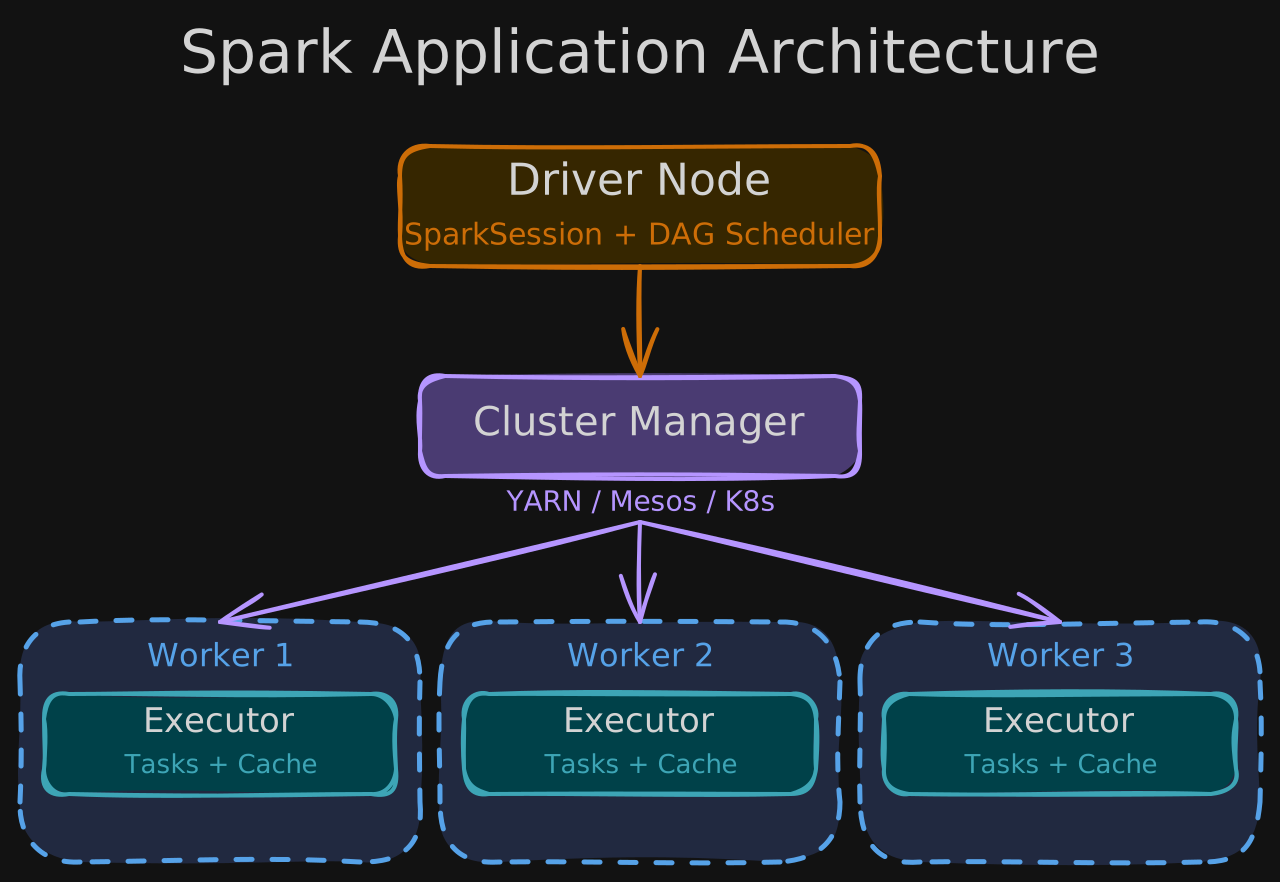
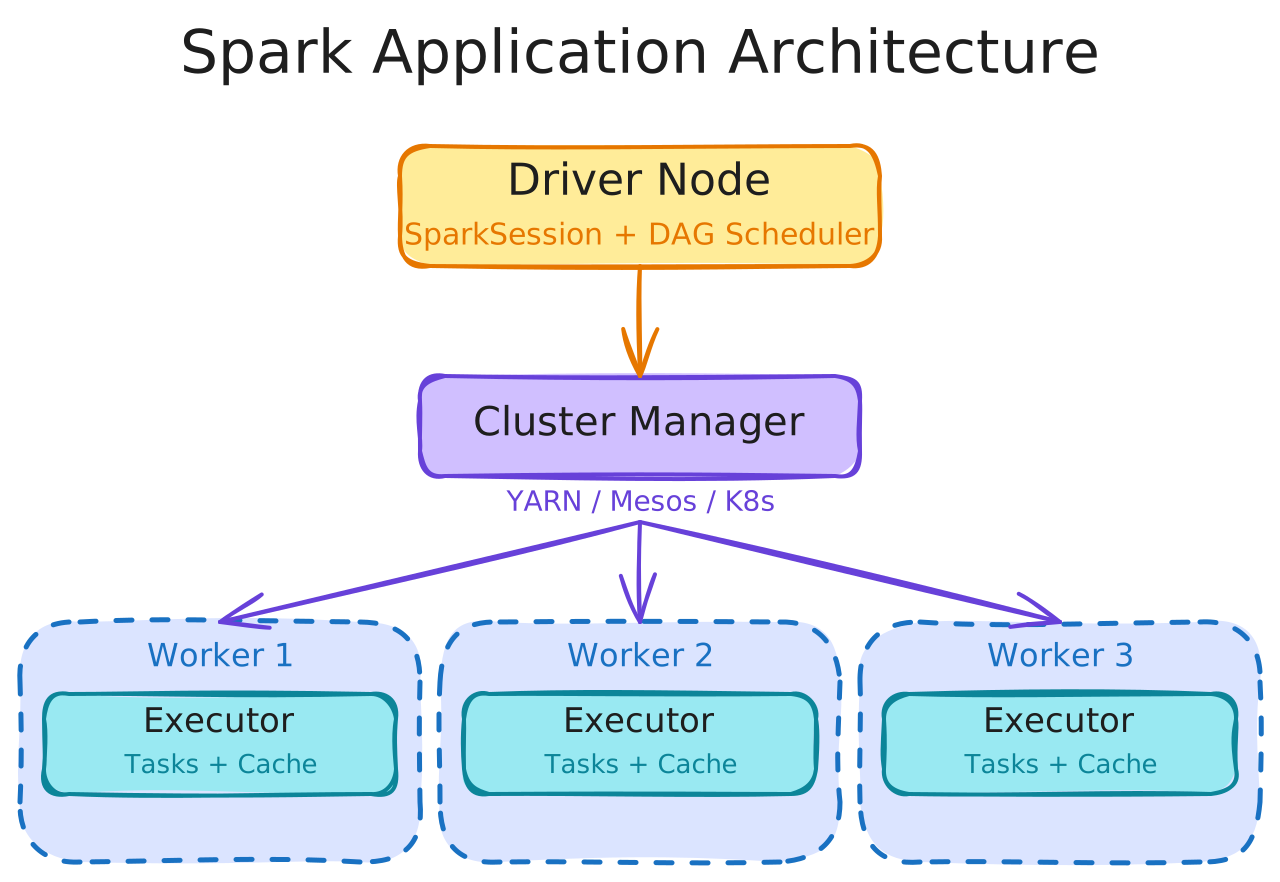
Spark Application Architecture
| Component | Role |
|---|---|
| Driver Node | Central controller - creates the SparkSession, builds execution plans, coordinates workers |
| Cluster Manager | Allocates and manages memory and CPU resources across the cluster (YARN, Mesos, or Kubernetes) |
| Worker Nodes | Each contains a Spark Executor that runs tasks assigned by the driver |
Partitioning and Execution
Spark breaks data into partitions when loading from disk, allocates partitions to executors based on network proximity, and assigns one partition per CPU core.
The SparkSession is the single unified entry point to all Spark functionality. The Driver translates instructions into Jobs (sequential by priority), which compile into a DAG of Stages (parallel where possible), each containing Tasks (parallel within the stage).
3.3.2 Spark DataFrames and Core Concepts
Spark DataFrames provide a high-level abstraction for working with large, distributed tabular datasets, hiding the complexity of distributed computation. They are built on top of RDDs (Resilient Distributed Datasets).
| Concept | Description |
|---|---|
| DataFrames vs. RDDs | RDDs are low-level, require manual optimization. DataFrames offer expressive APIs (filter, select, groupBy) with automatic optimization via Catalyst. |
| Transformations | Lazy operations that return new DataFrames without modifying originals (select, filter, join, groupBy) |
| Actions | Trigger actual execution of queued transformations (count, show, save) |
| Immutability | Original data is never modified - transformations create new DataFrames |
| Lineage | A record of transformations enables fault recovery - if a partition is lost, Spark recomputes it from the lineage |
| Lazy evaluation | Defers computation to optimize the full execution plan before running |
3.3.3 Basic PySpark DataFrame Operations
pip install pyspark findsparkimport findspark
findspark.init()
from pyspark.sql import SparkSession
spark = SparkSession.builder.appName("example").getOrCreate()Creating DataFrames
from pyspark.sql.types import (
    StructType, StructField, LongType, IntegerType, DoubleType, StringType
)

# Define data inline
data = [
    (100, 1, 1, 50.1, 1, "Thingamjig", 5, "Joe Reis"),
    (100, 2, 2, 25.08, 2, "Whatchamacallit", 5, "Joe Reis"),
    (101, 1, 3, 75.23, 1, "Whoozeewhatzit", 7, "Matt Housley"),
]

# Define schema explicitly
schema = StructType([
    StructField("OrderID", LongType(), True),
    StructField("ItemNumber", IntegerType(), True),
    StructField("SKU", IntegerType(), True),
    StructField("Price", DoubleType(), True),
    StructField("Quantity", IntegerType(), True),
    StructField("Name", StringType(), True),
    StructField("CustomerID", LongType(), True),
    StructField("CustomerName", StringType(), True),
])

orders_df = spark.createDataFrame(data, schema)
orders_df.show()

# Or read from CSV
transactions_df = spark.read.csv("transactions.csv", header=True)
Selecting, Manipulating, and Cleaning
from pyspark.sql.functions import col

# Select specific columns
transactions_df.select("price", "quantity", "country").show(5)

# Add a computed column (DataFrames are immutable - creates new DF)
transactions_df = transactions_df.withColumn(
    "amount", col("price") * col("quantity")
)

# Rename and drop columns
transactions_df = transactions_df.withColumnRenamed("invoice", "id")
transactions_df = transactions_df.drop("description")

# Remove nulls and filter invalid rows
transactions_df = transactions_df.dropna()
transactions_df = transactions_df.filter(col("quantity") > 0)
Aggregation
# Total amount per order
transactions_df.groupBy("id").sum("amount").show()

# Count per country, descending
transactions_df.groupBy("country").count().orderBy("count", ascending=False).show()
User-Defined Functions (UDFs)
from pyspark.sql.functions import udf
from pyspark.sql.types import StringType

# Register a Python function as a Spark UDF
@udf(StringType())
def to_upper(s):
    return s.upper()

transactions_df = transactions_df.withColumn("country", to_upper("country"))
Performance note: Python UDFs serialize data between the JVM and Python, adding overhead. For optimal performance, use built-in Spark functions or write UDFs in Scala/Java.