3.2 Query Performance and Advanced SQL
3.2.1 Understanding Query Performance
The EXPLAIN command reveals the execution plan the DBMS has chosen for a query - the sequence of steps, resource consumption, and performance statistics at each stage. It is the primary tool for diagnosing slow queries.
-- EXPLAIN shows the chosen execution plan without running the query
EXPLAIN
SELECT first_name, last_name
FROM employees
WHERE employee_id = 123;

-- Output shows: Index Scan on employees_pkey
-- (the optimizer chose the primary key index)
3.2.2 Advanced SQL Queries
Beyond basic SELECT/FROM/WHERE, SQL offers several powerful constructs for shaping data.
| Construct | Purpose |
|---|---|
SELECT DISTINCT | Return only unique combinations of selected columns |
CASE...WHEN...THEN | Conditional logic - create computed columns based on rules |
WITH...AS (CTEs) | Define named temporary result sets for readability |
| Subqueries | Embed a query inside another query for filtering |
| Window functions | Apply aggregates over a sliding range without collapsing rows |
DISTINCT and String Functions
-- DISTINCT removes duplicate rows from results
-- CONCAT and SUBSTR are server-specific string functions
SELECT DISTINCT
    fact_rental.staff_id,
    CONCAT(dim_staff.first_name, ' ',
           SUBSTR(dim_staff.last_name, 1, 1)) AS staff_name,
    fact_rental.customer_id
FROM fact_rental
JOIN dim_staff ON fact_rental.staff_id = dim_staff.staff_id;
CASE Expressions and Filtering
-- CASE creates computed columns based on conditional logic
-- IN filters on a set of values, BETWEEN filters on a range
SELECT
    fact_rental.customer_id,
    fact_rental.rental_id,
    CASE
        WHEN payment_date < return_date THEN 1
        ELSE 0
    END AS on_time_payment
FROM fact_rental
JOIN dim_customer
    ON dim_customer.customer_id = fact_rental.customer_id
WHERE dim_customer.country IN ('United States', 'Canada')
    AND fact_rental.rental_date BETWEEN '2005-05-24' AND '2005-07-26'
LIMIT 5;
Common Table Expressions (CTEs)
CTEs define temporary result sets that subsequent queries can reference. They start with WITH <name> AS (<query>) and are especially useful for breaking complex queries into readable steps.
-- CTEs can be chained - each one feeds into the next
WITH customer_payment_info AS (
    SELECT
        fact_rental.customer_id,
        fact_rental.rental_id,
        CASE
            WHEN payment_date < return_date THEN 1
            ELSE 0
        END AS on_time_payment
    FROM fact_rental
    JOIN dim_customer
        ON dim_customer.customer_id = fact_rental.customer_id
    WHERE dim_customer.country IN ('United States', 'Canada')
        AND fact_rental.rental_date BETWEEN '2005-05-24' AND '2005-07-26'
),
customer_percent_on_time AS (
    -- Second CTE uses the first CTE's output
    SELECT
        customer_id,
        AVG(on_time_payment) AS percent_on_time
    FROM customer_payment_info
    GROUP BY customer_id
)
SELECT MAX(percent_on_time)
FROM customer_percent_on_time;
Subqueries
Subqueries embed a query inside another, useful for simple filtering:
-- Find films longer than average
SELECT film_id, length
FROM dim_film
WHERE length > (SELECT AVG(length) FROM dim_film);
Window Functions
Window functions apply aggregate or ranking functions over a sliding range of rows without collapsing them - each row remains separate in the output.
-- rank() assigns a rank within each partition
-- PARTITION BY groups rows, ORDER BY defines ranking order
WITH customer_info AS (
    SELECT
        fact_rental.customer_id,
        dim_category.name,
        AVG(DATEDIFF(return_date, rental_date)) AS avg_rental_days
    FROM fact_rental
    JOIN dim_category
        ON fact_rental.category_id = dim_category.category_id
    GROUP BY fact_rental.customer_id, dim_category.name
)
SELECT
    customer_id,
    name,
    avg_rental_days,
    RANK() OVER (
        PARTITION BY customer_id
        ORDER BY avg_rental_days DESC
    ) AS rank_category
FROM customer_info
ORDER BY customer_id, rank_category;
3.2.3 Index Deep Dive
An index is a separate data structure with its own disk space that contains references back to the actual table rows. The DBMS query optimizer checks whether an index exists and whether an index-based plan would be more efficient than a full table scan.
B-Tree Index Structure
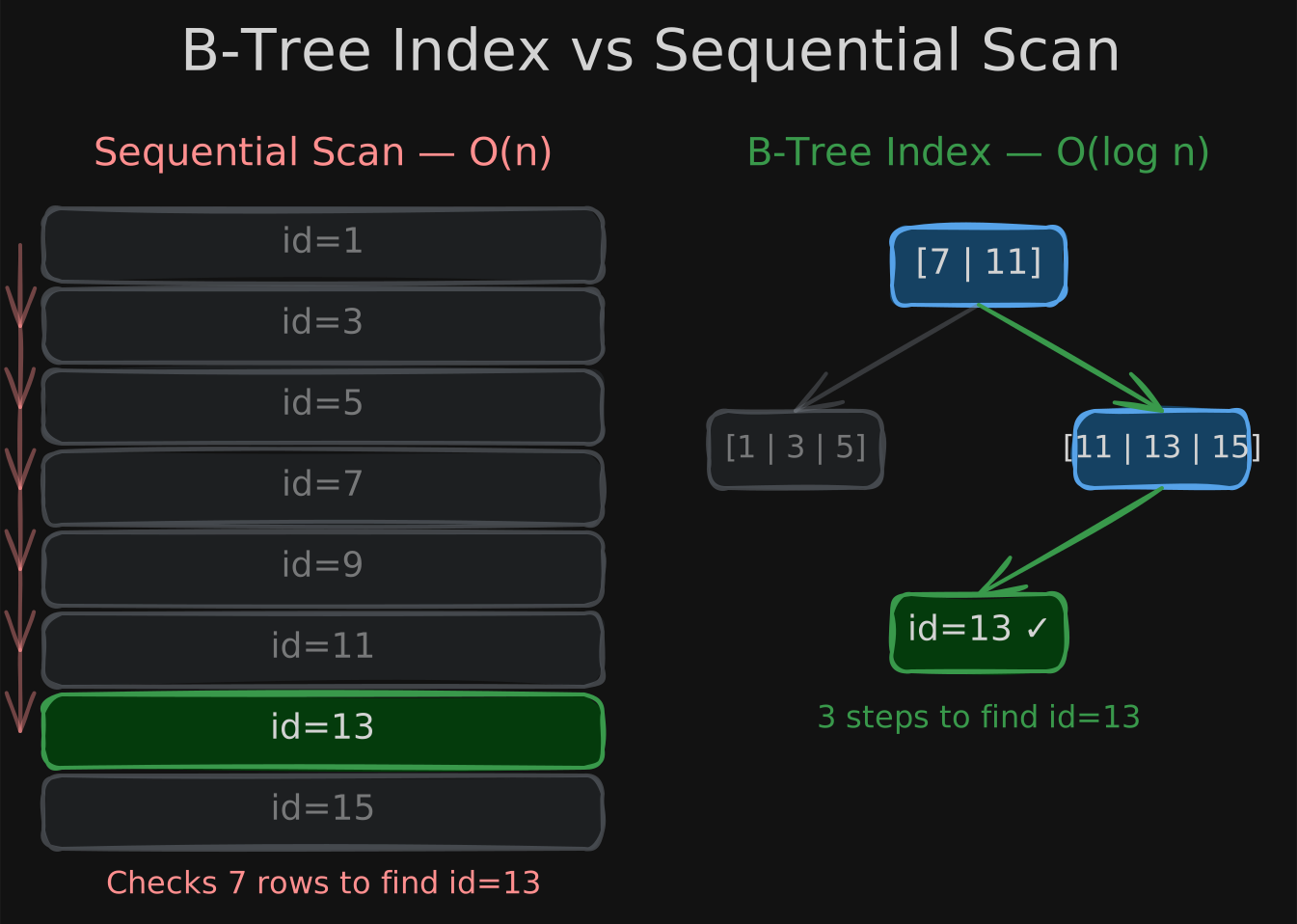
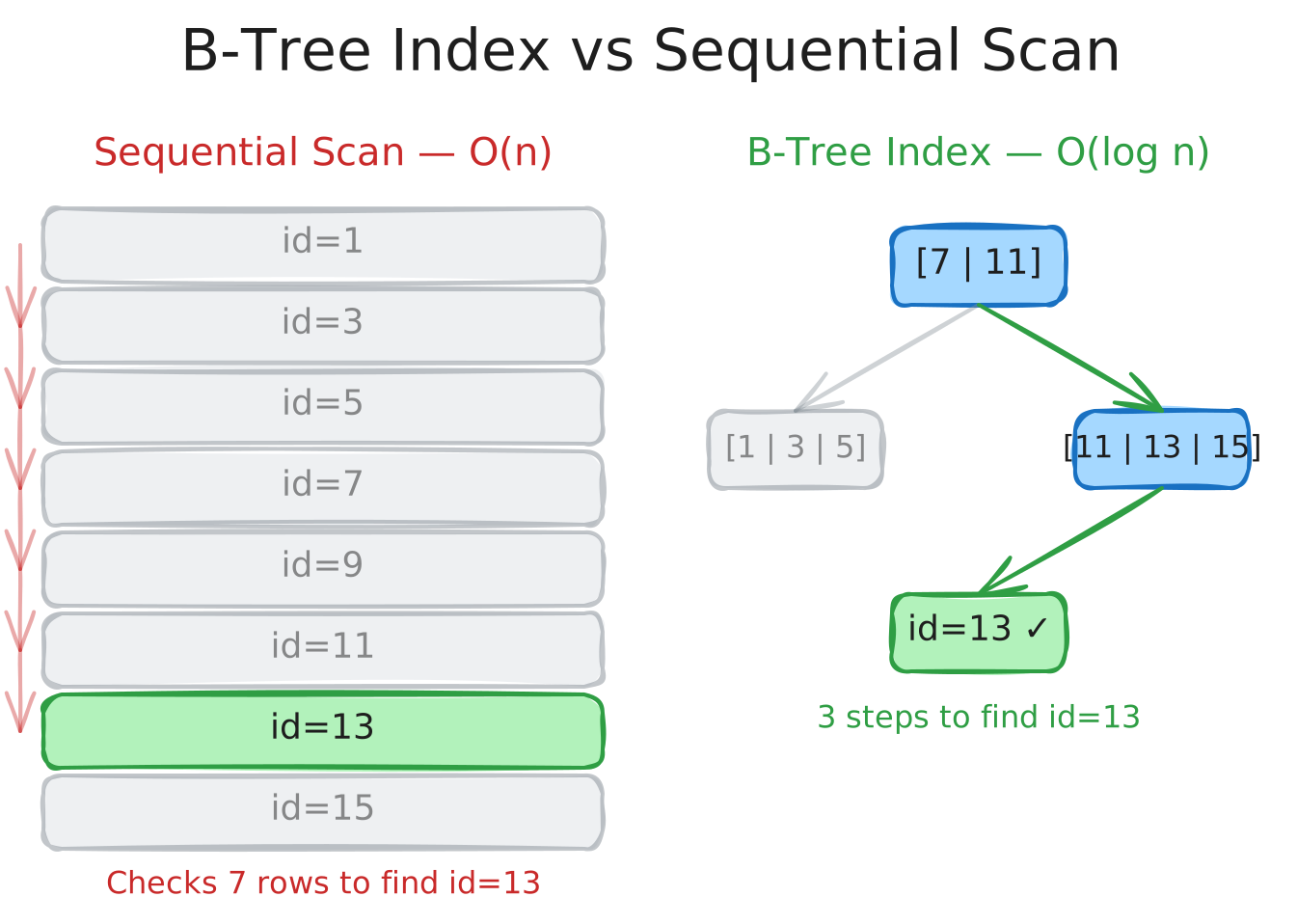
Index data is stored in blocks linked together to maintain order - the physical location of these blocks on disk does not matter. This linked structure makes it efficient to update the index when rows are inserted or deleted.
To retrieve indexed data, the DBMS traverses a Balanced Search Tree (B-Tree) where children are evenly distributed, giving O(log n) lookup time. If the indexed column contains non-unique values, the search may need to traverse a chain of leaf nodes horizontally - potentially as expensive as scanning the full tree. The query optimizer evaluates whether this trade-off is worthwhile.
| Scan Type | When Used | Complexity |
|---|---|---|
| Index scan | Query filters on an indexed column | O(log n) |
| Sequential scan | No matching index, or optimizer decides full scan is cheaper | O(n) |
Composite Index Ordering
The order of columns in a composite primary key determines which column gets indexed:
-- employee_id is the primary key → index scan
EXPLAIN
SELECT first_name, last_name
FROM employees
WHERE employee_id = 123;

-- Composite key (productcode, ordernumber) → index on productcode
-- Filtering by ordernumber requires a sequential scan
EXPLAIN
SELECT productcode, priceeach
FROM orderdetails
WHERE ordernumber = 10101;
-- Fix: redefine the key as (ordernumber, productcode)
-- to create an index on ordernumber instead
Columnar Indexes
Columnar storage applies the same ideas differently. On Amazon Redshift, you define a sort key on one or more columns - data is sorted by that key on disk. On Google BigQuery, the equivalent is a cluster key. Both enable the engine to skip irrelevant data blocks during scans.
3.2.4 Retrieving Only the Data You Need
Running SELECT * FROM orders forces large amounts of data to transfer from disk to memory and can be expensive on pay-as-you-go cloud databases. Use pruning techniques to exclude irrelevant data from being scanned.
| Technique | How it Works | Example |
|---|---|---|
| Row pruning | Filter rows using indexes or WHERE clauses | WHERE rental_id = 1 |
| Column pruning | Select only the columns you need | SELECT customer_id, rental_id FROM payment |
| Partition pruning | Scan only relevant partitions based on a partition key (e.g., date) | WHERE order_date = '2024-01-15' skips all other date partitions |
-- Create an index to speed up row pruning
CREATE INDEX rental_idx ON payment (rental_id);

-- Column pruning: only read the columns you need
SELECT customer_id, rental_id
FROM payment
WHERE rental_id = 1;